
Render Mermaid Diagrams in Markdown Preview
Visualize flowcharts, sequences, and diagrams directly in your markdown files
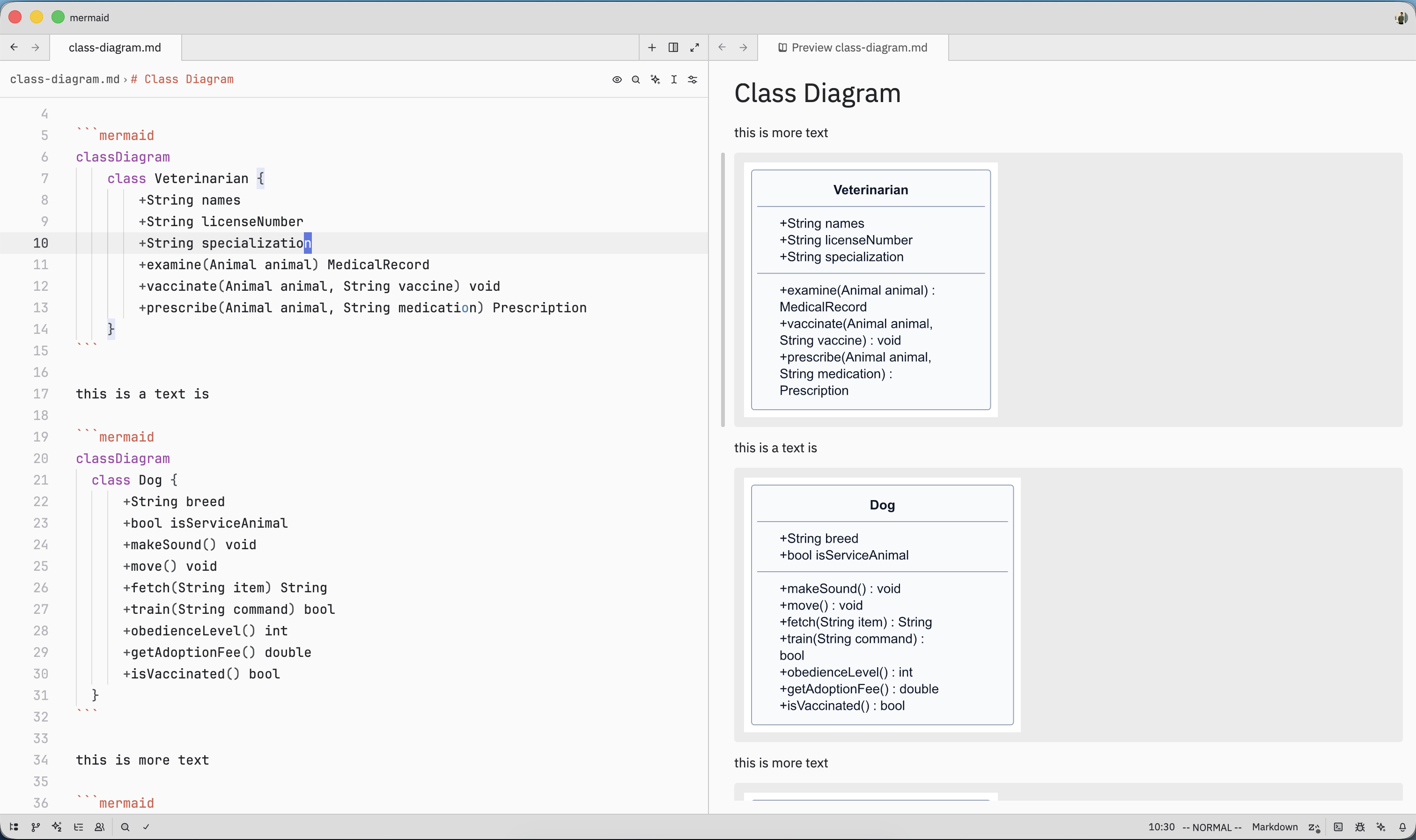
Mermaid diagrams now render beautifully in Zed’s markdown preview panel, letting you create flowcharts, sequence diagrams, and more using simple text syntax.
How to Use
- Open a markdown file in Zed
- Add a mermaid code block with your diagram syntax:
\`\`\`mermaid
graph TD
    A[Start] --> B{Decision}
    B -->|Yes| C[Action 1]
    B -->|No| D[Action 2]
\`\`\`- Open the markdown preview panel
- Your diagram renders automatically
Mermaid supports flowcharts, sequence diagrams, class diagrams, state diagrams, and more.
Why This Matters
Visual Documentation: Turn text into diagrams without external tools.
Version Control: Diagrams live in markdown, trackable in Git like code.
No Context Switching: View and edit diagrams without leaving Zed.
Always Up-to-Date: Diagrams are rendered on-demand, so they stay fresh as you edit.
This is perfect for architecture documentation, workflow diagrams, and any technical documentation that benefits from visual representation.