
Set Granular Permissions for Agent Tools
Control what the AI agent can do with per-tool permission rules
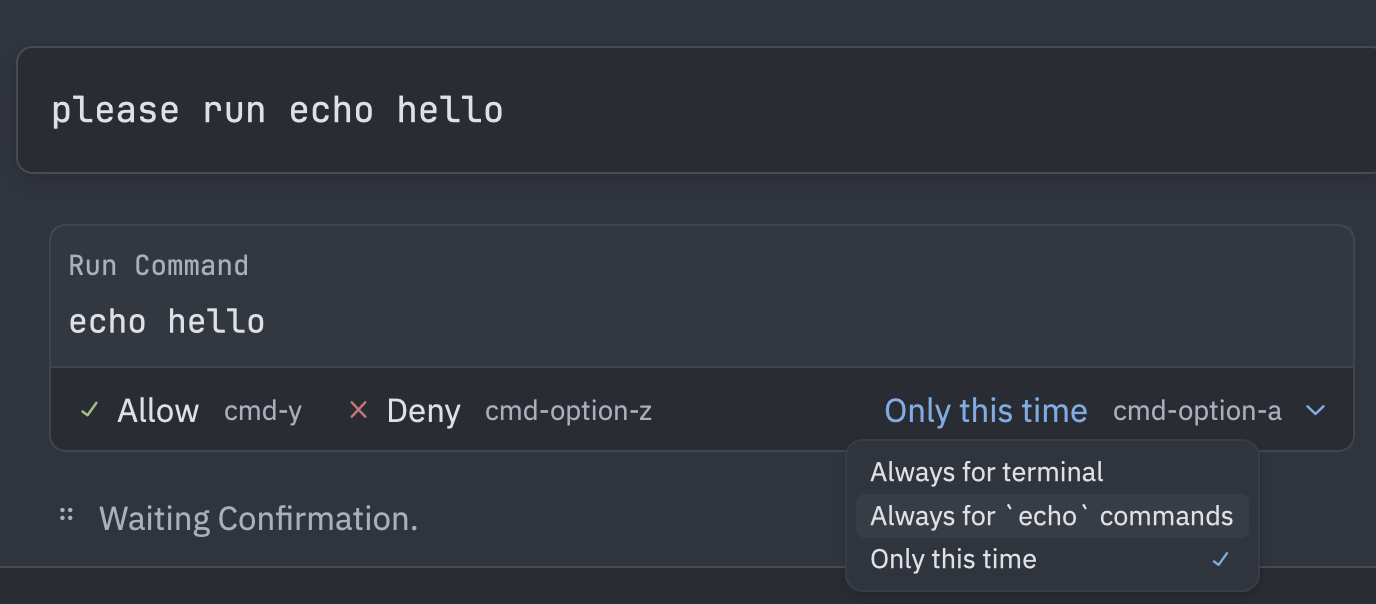
Take control of your AI agent’s actions with granular tool permissions. Instead of confirming every single tool use, set rules for which commands, files, or URLs the agent can access automatically.
How It Works
When the agent wants to use a tool (run a terminal command, edit a file, fetch a URL), Zed checks your permission rules. You can set per-tool policies that automatically:
- Always allow specific patterns (e.g.,
gitcommands) - Always deny dangerous operations (e.g.,
rm -rf) - Always confirm everything else (default)
Quick Setup
Add rules to your settings.json:
{
  "agent": {
    "tool_permissions": {
      "tools": {
        "terminal": {
          "default_mode": "confirm",
          "always_allow": ["^git\\s", "^npm\\s", "^cargo\\s"],
          "always_deny": ["^rm\\s+-rf", "^sudo\\s"]
        },
        "edit_file": {
          "default_mode": "allow",
          "always_deny": ["^\\.env", "^/etc/"]
        }
      }
    }
  }
}
Smart Permission Buttons
When a tool requires confirmation, the dialog shows contextual options:
- “Always allow
<tool>” - Trust this tool completely - “Always allow
<pattern>” - Auto-approve specific patterns:- Terminal: Command names (e.g.,
cargo,npm) - Files: Parent directory paths
- URLs: Domain names
- Terminal: Command names (e.g.,
- “Allow” / “Deny” - One-time decision
These buttons automatically update your settings, so you only need to decide once.
Supported Tools
terminal- Shell commandsedit_file,save_file- File modificationsdelete_path,move_path,copy_path- File operationscreate_directory- Directory creationfetch,web_search- Network requestsmcp:<server>:<tool>- Third-party MCP tools
Pattern Extraction
Zed intelligently extracts patterns from tool inputs:
- Terminal commands →
^cargo\\s,^npm\\s - File paths →
^/Users/alice/project/src/ - URLs →
^https?://github\\.com
Why It’s Useful
Safety: Block destructive commands like rm -rf or sudo automatically.
Productivity: Skip repetitive confirmations for trusted tools like git or npm.
Fine-grained control: Allow file edits in your project but deny system files.
MCP support: Set permissions for third-party tools from context servers.
Perfect for users who want the agent to work autonomously within safe boundaries!
Related PR: #46284