
Navigate Markdown with Structured Outlines
Hierarchical heading outline for better Markdown file navigation
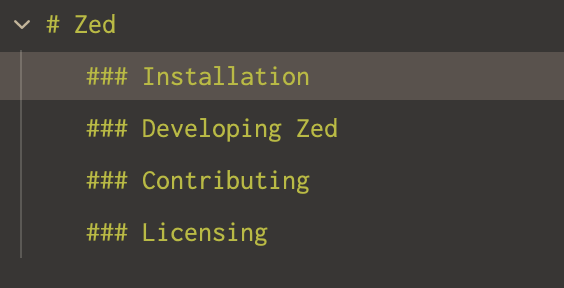
Markdown files now display a structured outline that shows the hierarchical relationship between headings, making it easier to navigate documentation, blog posts, and long-form content.
What Changed
Before: Markdown outlines showed all headings in a flat list, making it hard to understand document structure.
Now: Headings are displayed hierarchically (H1 > H2 > H3, etc.), reflecting the actual document organization.
How to Access
Open the outline panel for any Markdown file:
- Command Palette:
outline: toggle - Keyboard shortcut: Configure in your keybindings
- Menu: View → Toggle Outline Panel
The outline automatically updates as you edit the document.
Benefits
Visual hierarchy: Instantly see how sections and subsections relate
Faster navigation: Click any heading to jump directly to that section
Better comprehension: Understand document structure at a glance
Improved editing: Reorganize sections with full context of the hierarchy
Sticky scroll support: The breadcrumb now correctly shows your current heading when scrolling
Perfect For
- Documentation: Navigate API docs, guides, and technical writing
- Blog posts: Jump between sections in long-form articles
- READMEs: Quickly find specific sections in project documentation
- Notes: Organize and browse hierarchical note structures
- Books/Essays: Work with complex document structures
Related Improvements
This feature also fixes sticky scroll behavior in Markdown files—the breadcrumb now correctly displays your current heading as you scroll through the document.
Example Structure
# Main Title
  ## Section 1
    ### Subsection 1.1
    ### Subsection 1.2
  ## Section 2
    ### Subsection 2.1
The outline displays this hierarchy visually, making navigation intuitive and efficient!
Related PR: #45643