
Back to tips
Add Run Buttons for Bun Tests
Configure test runner tasks to get inline run buttons in test files
#testing
#bun
#tasks
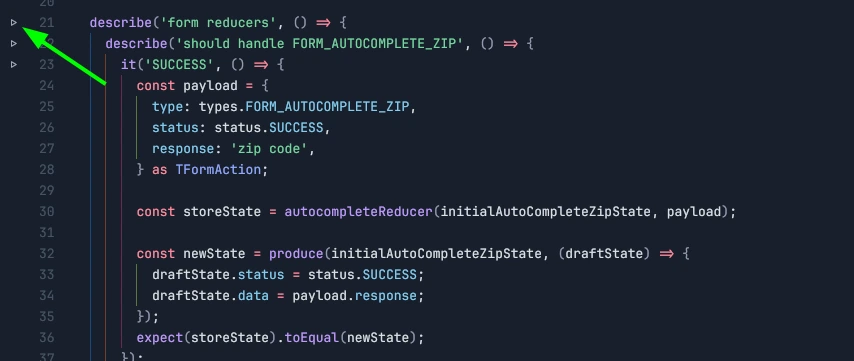
If you’re a JS/TS developer who uses Bun and your project has @types/bun in package.json, Zed will automatically surface bun test run tasks for you.
If you are using a different setup where Bun isn’t automatically detected, here’s how to add bun test run tasks yourself.
Configuration
Add the following to your tasks.json file:
[
  {
    "label": "Bun Test",
    "command": "bun test",
    "args": ["\"$ZED_RELATIVE_FILE\" -t=\"$ZED_SYMBOL\""],
    "tags": ["js-test", "ts-test", "bun-test", "tsx-test"]
  }
]
How It Works
The tags field is crucial - it tells Zed which file types should display the run buttons. With the tags configured above, you’ll see play buttons in the gutter of your JavaScript, TypeScript, and TSX test files.
Click the button to run your tests with Bun:
- Next to individual test functions (uses
$ZED_SYMBOL) - At the file level to run all tests in that file
Key Configuration Elements
$ZED_RELATIVE_FILE: The current file path relative to the project root$ZED_SYMBOL: The current symbol (test name) under the cursortags: Specifies which file types get the run buttons (crucial for making this work!)
This pattern works with any test runner - just adjust the command and tags accordingly.